Tuesday, January 5, 2021

5 Steps to Create an Outstanding Marketing Plan [Free Templates]

Do you take a good, hard look at your team's marketing strategy every year?

You should. An annual marketing plan helps you set your marketing on the right course to make your company's business goals a reality. Think of it as a high-level plan that guides the direction of your team's campaigns, goals, and growth.

Without one, things can get messy -- and it's nearly impossible to put a number on the budget you'll need to secure for the projects, hiring, and outsourcing you'll encounter over the course of a year if you don't have a plan.

Keep in mind there are variations to the marketing plan you need, depending on your industry and the goals of your marketing team. To make your plan's creation easier, we've put together a list of what to include in your plan and a few different planning templates where you can easily fill in the blanks.

To start, let's dive into how to create a marketing plan and then take a look at what a high-level marketing plan has inside.

In this article, we're going to discuss: 

1. Conduct a situation analysis.

Before you can get started with your marketing plan, you have to know your current situation.

What are your strengths, weaknesses, opportunities, and threats? Conduct a basic SWOT analysis is the first step to creating a marketing plan.

Additionally, you should also have an understanding of the current market. How do you compare to your competitors? Doing a competitor analysis should help you with this step.

Think about how other products are better than yours. Plus, consider the gaps in a competitor's approach. What are they missing? What can you offer that'll give you a competitive advantage? Think about what sets you apart.

Answering questions like this should help you figure out what your customer wants, which brings us to step number two.

2. Define your target audience.

Once you have a better understanding of the market and your company's situation, make sure you know who your target audience is.

If your company already has buyer personas, this step might just mean you have to refine your current personas.

If you don't have a buyer persona, you should create one. To do this, you might have to conduct market research.

Your buyer persona should include demographic information such as age, gender, and income. However, it will also include psychographic information such as pain points and goals. What drives your audience? What problems do they have that your product or service can fix?

Once you have this information written out, it'll help you define what your goals are, which brings us to step number three.

3. Write SMART goals.

My mother always used to tell me, "You can't go somewhere unless you have a road map." Now, for me, someone who's geographically challenged, that was literal advice.

However, it can also be applied metaphorically to marketing. You can't improve your ROI unless you know what your goals are.

After you've figured out your current situation and know your audience, you can begin to define your SMART goals.

SMART goals are specific, measurable, attainable, relevant, and time-bound. This means that all your goals should be specific and include a time frame for which you want to complete it.

For example, your goal could be to increase your Instagram followers by 15% in three months. Depending on your overall marketing goals, this should be relevant and attainable. Additionally, this goal is specific, measurable, and time-bound.

Before you start any tactic, you should write out your goals. Then, you can begin to analyze which tactics will help you achieve that goal. That brings us to step number four.

4. Analyze your tactics.

At this point, you've written down your goals based on your target audience and current situation.

Now, you have to figure out what tactics will help you achieve your goals. Plus, what are the right channels and action items to focus on.

For example, if your goal is to increase your Instagram followers by 15% in three months, your tactics might include hosting a giveaway, responding to every comment, and posting three times on Instagram per week.

Once you know your goals, brainstorming several tactics to achieve those goals should be easy.

However, while you're writing your tactics, you have to keep your budget in mind, which brings us to step number five.

5. Set your budget.

Before you can begin implementing any of your ideas that you've come up with in the steps above, you have to know your budget.

For example, your tactics might include social media advertising. However, if you don't have the budget for that, then you might not be able to achieve your goals.

While you're writing out your tactics, be sure to note an estimated budget. You can include the time it'll take to complete each tactic in addition to the assets you might need to purchase, such as ad space.

Now that you know how to create your marketing plan, let's dive into the elements that a high-level marketing plan should include.

Marketing Plan Outline

Marketing plans can get quite granular to reflect the industry you're in, whether you're selling to consumers (B2C) or other businesses (B2B), and how big your digital presence is. Nonetheless, here are the elements every effective marketing plan includes:

1. Business Summary

In a marketing plan, your Business Summary is exactly what it sounds like: a summary of the organization. This includes:

  • The company name
  • Where it's headquartered
  • Its mission statement

2. Business Initiatives

The Business Initiatives element of a marketing plan helps you segment the various goals of your department. Be careful not to include big-picture company initiatives, which you'd normally find in a business plan. This section of your marketing plan should outline the projects that are specific to marketing. You'll also describe the goals of those projects and how those goals will be measured.

3. Customer Analysis

Here's where you'll conduct some basic market research. If your company has already done a thorough market research study, this section of your marketing plan might be easier to put together.

Ultimately, this element of your marketing plan will help you describe the industry you're selling to and your buyer persona. A buyer persona is a semi-fictional description of your ideal customer, focusing on traits like:

  • Age
  • Location
  • Title
  • Goals
  • Personal challenges
  • Pains
  • Triggering events

4. Competitor Analysis

Your buyer persona has choices when it comes to solving their problems, choices in both the types of solutions they consider and the providers that can administer those solutions. In your market research, you should consider your competition, what they do well, and where the gaps are that you can potentially fill. This can include:

  • Positioning
  • Market share
  • Offerings
  • Pricing

5. SWOT Analysis

Your marketing plan's Business Summary also includes a SWOT analysis, which stands for the business's strengths, weaknesses, opportunities, and threats. Be patient with your business's SWOT analysis; you'll write most of it based on your market research from the sections above and your strategy below.

6. Market Strategy

Your Market Strategy uses the information included in the above sections to describe how your company should approach the market. What will your business offer your buyer personas that your competitors aren't already offering them?

In a full-length marketing plan, this section can contain the "seven Ps of marketing":

  • Product
  • Price
  • Place
  • Promotion
  • People
  • Process
  • Physical Evidence

(You'll learn more about these seven sub-components inside our free marketing plan template, which you can download below.)

7. Budget

Don't mistake the Budget element of your marketing plan with your product's price or other company financials. Your budget describes how much money the business has allotted the marketing team to pursue the initiatives and goals outlined in the elements above.

Depending on how many individual expenses you have, you should consider itemizing this budget by what specifically you'll spend your budget on. Example marketing expenses include:

  • Outsourcing costs to a marketing agency and/or other providers
  • Marketing software
  • Paid promotions
  • Events (those you'll host and/or attend)

8. Marketing Channels

Lastly, your marketing plan will include a list of your marketing channels. While your company might promote the product itself using certain ad space, your marketing channels are where you'll publish the content that educates your buyers, generates leads, and spreads awareness of your brand.

If you publish (or intend to publish) on social media, this is the place to talk about it. Use the Marketing Channels section of your marketing plan to lay out which social networks you want to launch a business page on, what you'll use this social network for, and how you'll measure your success on this network. Part of this section's purpose is to prove to your superiors, both inside and outside the marketing department, that these channels will serve to grow the business.

Businesses with extensive social media presences might even consider elaborating on their social strategy in a separate social media plan template.

9. Financial Projections

Knowing the budget and doing analysis on the marketing channels you want to invest in, you should be able to come up with a plan for how much budget to invest in which tactics based on expected ROI. From there, you'll be able to come up with financial projections for the year. These won't be 100% accurate but can help with executive planning.

Free Marketing Plan Template [Word]

Now that you know what to include in your marketing plan, it's time to grab your marketing plan template and see how best to organize the six elements explained above. The following marketing plan template opens directly in Microsoft Word, so you can edit each section as you see fit:
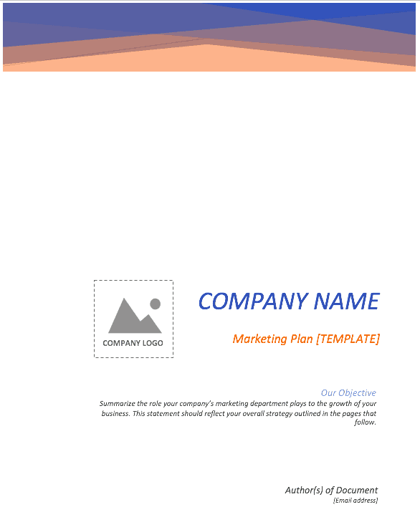
Cover page of free marketing plan template

Download your marketing plan template here.

Social Media Marketing Plan Templates

As marketing departments grow, so will their presence on social media. And as as their social media presence grows, so will their need to measure, plan, and re-plan what types of content they want to publish across each network.

If you're looking for a way to deepen your social media marketing strategy -- even further than the marketing plan template above -- the following collection of social media marketing plan templates is perfect for you:

Download 10 social media reporting templates here.

In the above collection of marketing plan templates, you'll get to fill in the following contents (and more) to suit your company:

  • Annual social media budget tracking
  • Weekly social media themes
  • Required social media image dimension key
  • Pie chart on social media traffic sorted by platform
  • Social media post calendar and publish time

Below, let's review the social media reporting templates, and what you'll find in each one.

1. Social Media Questions
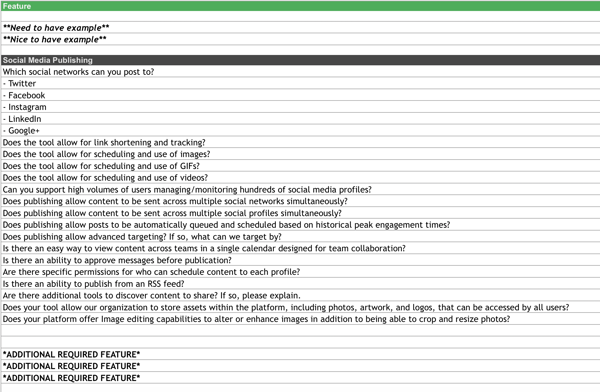
Social media publishing analysis and questions.

This template lists out questions to help you decide which social media management platform you should use.

Once you know what social media tactics you're going to implement in your marketing plan, it's time to figure out what channels are right for you. This template will help you do that.

2. Hashtag Holidays
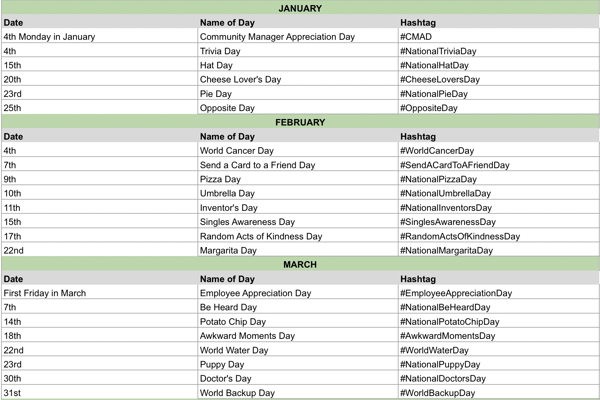
Social media hashtag holidays.

If you're going to lean in to social media in your marketing plan, you can use hashtag holidays to generate ideas.

These holidays are a great way to fill out your social media publishing schedule. With this template, you'll get a list of all the hashtag holidays for the year.

3. Facebook Live Schedule
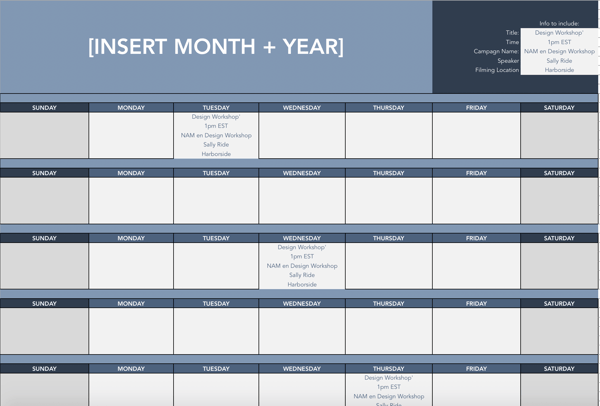
Facebook live schedule template.

If Facebook live is one of the marketing tactics in your plan, this template will help you design an editorial calendar. With this template, you can organize what Facebook live's you want to do and when.

4. Instagram Post Log
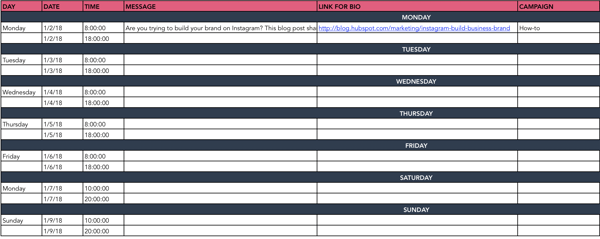
Instagram post log for social media publishing management.

Are you going to begin using Instagram regularly? Do you want to increase your following? With this template, you can organize your Instagram posts, so everyone on your team knows what posts are going live and when.

Additionally, you can organize your assets and campaigns on this doc.

5. Paid Social Media Template
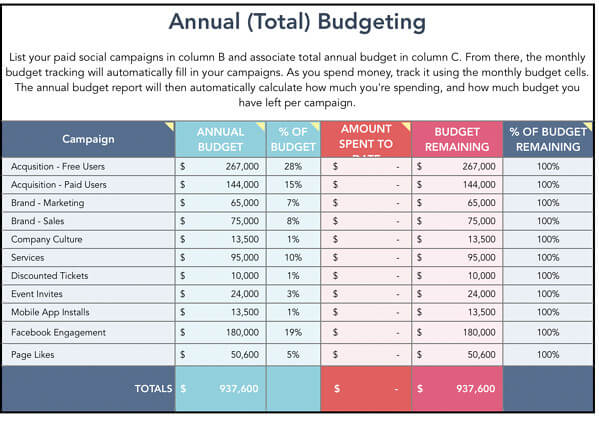
paid social media template for annual budgeting

With this template, you can organize your annual and monthly budget for your paid social media calendar.

6. Social Media Audit
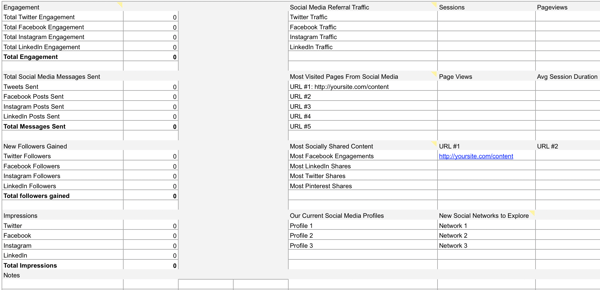
Social media audit template.

Conducting a social media audit? You can use this template to help you gather the right analytics.

7. Social Media Editorial Calendar
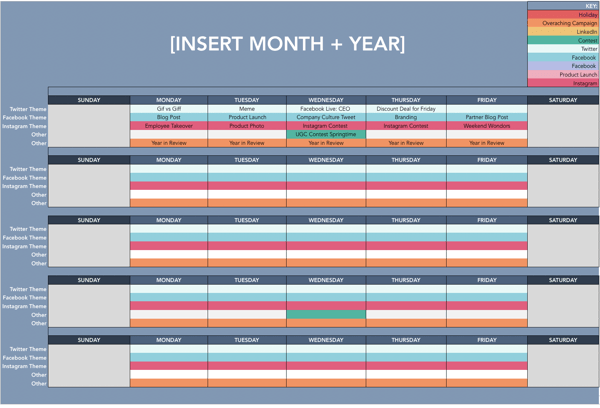
Social media editorial calendar template.

With this template, you can organize your social media editorial calendar. For example, you can include social media posts for each platform, so your team knows what's going live on any given day.

8. Social Media Image Sizes
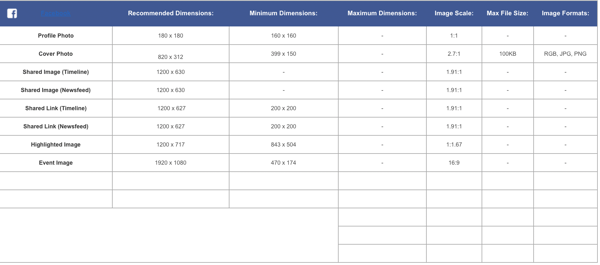
Social media image size template.

With this template, your team can have the latest social media image sizes handy. This template includes image sizes for all major social media platforms, including Facebook, Instagram, and Twitter.

9. Social Media Marketing Proposal
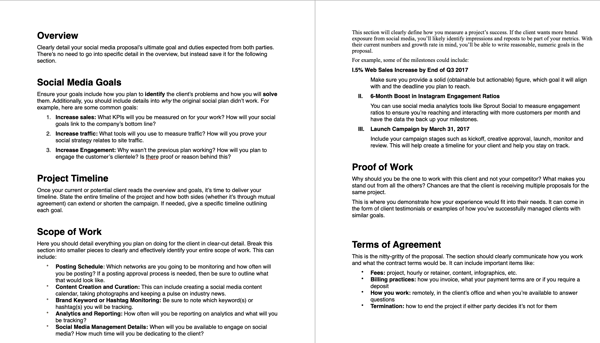
Social media marketing proposal template.

With this template, you can create an entire social media marketing proposal. This will outline the social media goals, scope of the work, and the tactics that you plan to implement.

10. Social Media Reporting Template
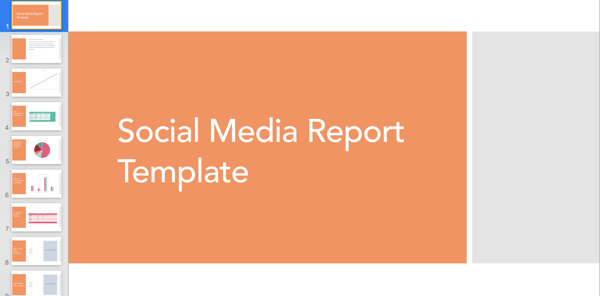
Social media report template.

With this template, you'll gain access to a slidedeck that includes templates for social media reporting. If you plan to implement social media in your marketing plan, these reporting templates can help you track your progress.

Simple Marketing Plan Template

Of course, this type of planning takes a lot of time and effort. So if you're strapped for time before the holidays, give our new Marketing Plan Generator a try. This tool simplifies yearly planning and lays your strategies, initiatives, and goals out in a simple template so you can identify what's most important for the coming year.

Try our free Marketing Plan Generator here.

Once you've filled in your information, you'll come away with a plan that helps you:

  • Outline your annual marketing strategy
  • Identify your most important annual initiatives
  • Nix the projects that won't help you hit your goals
  • Track the right metrics throughout the year
  • Align your team through a common mission

Pro Tip: The best way to set up your marketing plan for the year is to start with quick wins first, that way you can ramp up fast and set yourself (and your team) up to hit more challenging goals and take on more sophisticated projects by Q4. So, what do you say? Are you ready to give it a spin?

Editor's note: This post was originally published in December 2016 and has been updated for comprehensiveness.

Posted by https://bit.ly/31tHUKW
How to Easily Create a SlideShare Presentation

You know how hot visual content is, and you want to jump on board to enjoy the engagement, traffic, and leads that follow. But maybe you're not keen on writing a blog post, and you don't have the production resources to create videos. What to do? Create a SlideShare presentation.

I know, I know. You may have felt personally victimized by PowerPoint sometime in your career. When you open it up, you're hit with stark black Calibri font on a white background, killing any creative spark you may have felt. It's daunting enough to create a 10-slide deck to report your monthly marketing metrics -- never mind putting together slides that can be seen by the large volume of SlideShare users.

Well, there's good news: Creating a SlideShare presentation in PowerPoint doesn't have to be that daunting. With the right templates and tools at your disposal, you could easily create an engaging, visual presentation -- all without fancy design programs, huge budgets, or hiring contractors.

How to Create a Stunning  SlideShare Presentation in PowerPoint

To help you make a SlideShare of your own, we've created some free PowerPoint presentation templates for making awesome SlideShares. That way, your presentations will look great and be a breeze to put together.

Download the free PowerPoint templates, scroll down, and we'll walk through how to use them. When we're done, you'll know exactly how to create a sexy presentation that gets featured on SlideShare's homepage. Ready? Let's dive in.

1. Get a feel for the types of presentations you can find on SlideShare. 

Just as you'd master any other medium, it helps to consume other content in that medium to get an idea of the format and what works. Go to SlideShare.net and discover SlideShares that interest you. You can view them on the platform or download them to your computer and peruse them on your local machine. 

SlideShare Presentation Download

Here's how to download a PowerPoint from SlideShare:

  1. Sign up for a SlideShare account.
  2. Navigate to the SlideShare presentation that you want to download.
  3. Click the button labeled "Download."
  4. When asked if you want to clip the slide, click "Continue to download."
  5. Click "Save File" and then confirm by clicking "OK."

Some may not download as a .ppt file, and some may not be available to download at all. However, this method works in all other cases.

2. Decide on fonts and a color scheme. 

Before you get too caught up in the specifics of your storyline, figure out which fonts and color scheme you want to use. (If you're using our free templates, you can skip this part.) 

When you're choosing fonts, consider two different ones to use throughout your presentation -- one for your headers and one for your body text. Your header font should be bold and eye-catching, and your body text font should be simple and easy to read. The contrast between the two will make it much easier for your SlideShare viewers to grasp your core messages. 

For your color scheme, pick a scheme that will have enough contrast between colors to make colors stand out. Whether you decide to use two, three, or four different colors in your presentation is up to you -- but certain color combinations go together better than others.

Below is an example of what certain fonts and color combinations can look like. Notice how the header fonts stand out much more than the body? You can also see what different color palettes might look like: The top is monochromatic, the middle is complementary, and the bottom is analogous. 

3 combinations of header and body fonts.

3. Outline main takeaways and crucial sub-bullets.

Next up: Creating an outline for your SlideShare's narrative. I like to treat SlideShare outlines just like I would blog posts -- you decide on the working title and main takeaways first. Then, you elaborate on those sections with a few supporting points.

For each of those components (title, section headers, and a few supporting points), create a slide. Below is an example of what those slides might look like: 

Title

title slide using hubspot powerpoint template

Headers

header slide using hubspot powerpoint template

Supporting Points

supporting point slide using hubspot powerpoint template

You'll also want to create slide placeholders for the call-to-action and conclusion slides (you don't need to elaborate on them just yet).

Keep in mind that these slides should not be complex -- just a title and maybe a few details that you want to remember down the road. No paragraphs. No supporting images. Nothing that's not built into your template already. 

4. Fill out the body of your presentation.

Then, fill in the meat of the content -- all the slides between the headers. Just make sure you're not relying too much on text. SlideShare is a primarily visual platform -- people are used to breezing through presentations. So if your presentation reads like an ebook, you should edit down the text and rely more heavily on visual content. 

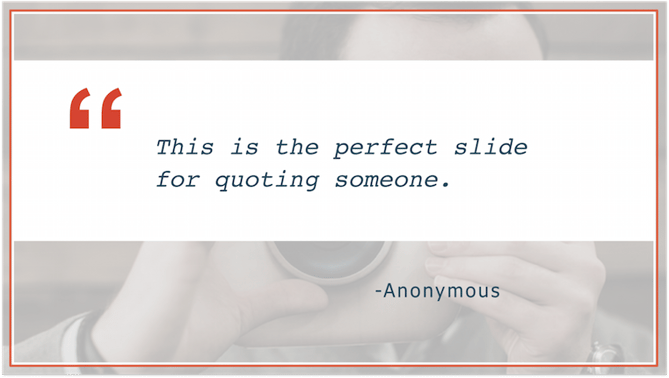
Another thing to remember is to switch up your format from slide to slide. Try doing a checklist slide followed by, say, a quote slide -- it keeps people on their toes as they flip through your presentation.

checklist slide in hubspot powerpoint template

quote slide in hubspot powerpoint template

5. Add introduction slides. 

After you've created the majority of your SlideShare presentation, head back to the start. Wonder why we didn't begin here? It'll be much easier to tee up the bulk of your content if you already know what that content is about. In this step, just introduce what you just wrote about -- it'll be a breeze. 

6. Wrap up the conclusion.

Then, head to the end of your SlideShare and wrap it up in a slide or two. There is nothing more jarring than going from a body slide right to a CTA slide. You only need a slide or two to conclude your presentation, but it should naturally tee up the CTA that you will have next. 

7. Add a call-to-action slide.

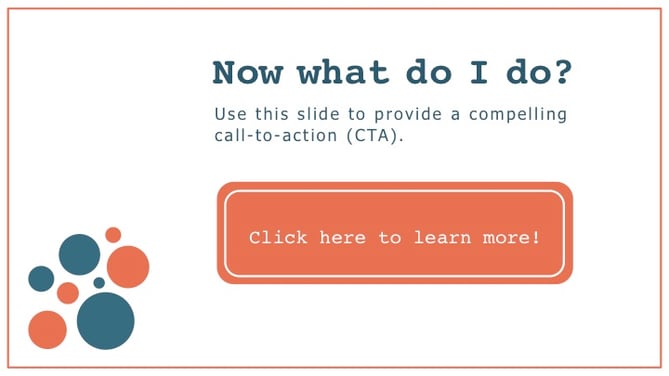
At the verrrrrry end of your SlideShare, you want to keep your viewers engaged by providing a call-to-action. The CTA could be about downloading an ebook, attending an event, or even just visiting your website -- pretty much any CTA you'd like to include. Here are two CTA slide examples that we included in the SlideShare template:

cta slide in hubspot powerpoint template

cta slide in hubspot powerpoint template

8. Edit, edit, edit.

You're almost there! Next, you need to go through and edit your copy and design components. Try to get another coworker -- marketer or not -- to give it a once over. If you need some direction, you can use our ultimate editing checklist to make sure you're catching everything you can.

9. Add "animated slides" and clickable links.

Though it's easy to create a presentation in PowerPoint and upload it immediately to SlideShare, not all of the same features will appear in both programs. As a result, there are two things you'll need to add in: "animated slides" and clickable links. 

As far as slide animation goes, SlideShare does not support PowerPoint animations. This means that all of those smooth entrances you planned for your text boxes and objects go out the window once you upload your presentation to SlideShare. But, it's easy to manually introduce new elements on a series of slides to make it seem like it's "animated."

Once you've built in your animations, you'll also need to make sure people can actually click on the CTAs in your presentation. 

10. Upload your PDF to SlideShare.

After you're finished with your clickable links, your presentation will be in a PDF format. At this point, you're ready for the final step: uploading your PDF to SlideShare. When you do this, you have the option to add a description and tags, and even schedule the SlideShare to go live at a certain time. Once your SlideShare is live, you should spend some time promoting it on your blog and social media accounts, and to your email lists. (For more SlideShare promotion tips, check out this blog post.)

Just follow this process when you need to create a SlideShare presentation, and you won't have to fear that blank PowerPoint template ever again. 

Editor's Note: This post was originally published in August 2013 and has been updated for freshness, accuracy, and comprehensiveness.

Posted by https://bit.ly/31tHUKW
What Is a Blog Category and Why Are They Important for Your Blog?

Do you read every post on a blog? If you're like me, you visit sites for a specific reason — be it the New York Times crossword puzzle or the latest gear roundup from Outside. You know what you're looking for when you click. That frame of mind is why blog categories help readers navigate your site.

But what categories should you choose? How do you name them? And what's the difference between categories and tags?

Let's cut the confusion with blog category best practices that keep readers combing through your content.

For example, imagine you run a food blog. You create recipes, write reviews for appliances, and share photography tips. These main topics (recipes, reviews, photography) are your blog categories. But within each topic fall a handful of sub-topics like bread and pastry recipes, small appliance and tool reviews, and low lighting and stop-motion photography tutorials.

If I'm visiting your site for dinner inspiration, I should be able to quickly click your recipes category to view all of the tasty options you have to offer.

No matter what kind of blog you run, the content you create needs to fall under one of your chosen categories.

Why Blog Categories Are Important

You put hours of work into each blog post, and you don't want it to disappear into the black hole of your archives. Without defined blog categories, your content quickly sinks out of view — only to be found by endless scrolling. Preventing this from happening is only one benefit of categories.

1. Blog categories provide simple site navigation.

A visually appealing site is incredibly important for visitors. 90% of people have left a website due to poor design. Blog categories group content under a handful of topics, so people get to where they want to be, fast. Some website themes limit the number of categories you can create, so make sure to consider that before grouping your content.

2. Blog categories improve site SEO.

Categories give you a leg up in the blog SEO game by adding hierarchy to your pages. This helps search engines better understand what each page is about and rank accordingly.

If you create a category page, for instance, and continue adding and linking posts that are relevant to that category, it will become increasingly optimized. Search engines will recognize this and bump up the ranking, which makes it easier for people to find your site.

3. Blog categories make blog content strategy easier.

Planning an editorial calendar is no easy feat. But with well-defined blog categories, you have a guide for what to write about. Your strategy can touch on each category to avoid stacking one with all the content. This rounds out your blog and prevents you from falling into single-category chaos.

If that's not enough to sway you, know that 65% of the most successful North American bloggers have a well-documented content marketing strategy. Among the least successful bloggers, 39% admit they don't have any strategy and 14% actually write down a strategy.

Blog Category Examples

Every blog is unique, but it's worthwhile to look at others for inspiration. Here are a few examples of how different sites sort their content into blog categories.

1. HubSpot

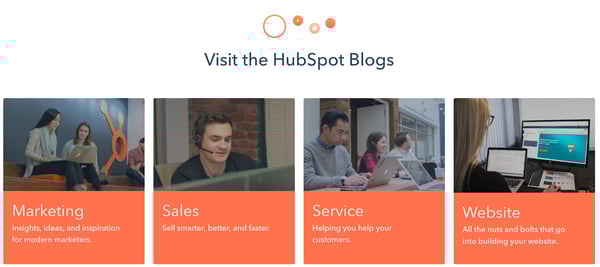
Since you're already here, let's take a look at how this blog is organized. The main categories are Marketing, Sales, Service, and Website. But within the Marketing category, for example, are sub-topics like social media, branding, SEO, and digital marketing.

HubSpot Blog Category example

Image source

2. Patagonia

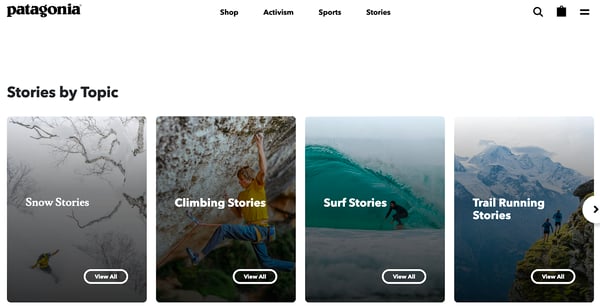
Outside of their product website, Patagonia runs a blog called The Cleanest Line. It's broken down into the following categories: Stories, Films, Books, and Activism. You can search deeper by clicking on sub-topics organized by sports like kitesurfing, climbing, and trail running.

Patagonia blog categories

Image source

3. The New Yorker

Personally, I go for the cartoons. But The New Yorker has a lot to offer, which is why they sort content into 10 categories: News, Books & Culture, Fiction & Poetry, Humor & Cartoons, Magazine, Crossword, Video, Podcasts, Archive, Goings On.

blog categories on The New Yorker

Image source

4. Joy the Baker

I could scroll through this site all day, but it's easy to navigate thanks to five categories: Recipes, Cookbooks, The BakeHouse, Drake on Cake, and Workshops. Joy infuses her personality into the names while still making it clear what she's all about: delicious baked goods.

Joy the Baker blog organization tags

Image source

Blog Categories vs. Tags

Maybe you've grouped all your posts under one category and gone tag crazy to create some sort of structure. You're not the only one. The world of tags and categories can be confusing. But now is the time to learn the difference between the two so you know when to use one versus the other.

While categories and tags help organize your site, you already know categories are the high-level topics to guide readers where they want to go. Categories usually make up your navigation bar or are displayed on a sidebar for people to see. The fewer categories you have, the better. This is especially important if you're running a niche blog, because it helps you stand out from the other sites in the space.

There's no hard and fast rule for the right number of categories, but most niche blogs have between three to five, while larger sites have around five to ten categories. The New York Times has 19 categories, but this is definitely too many for most businesses. The larger the number, the more difficult it is to stay organized.

On the other hand, a tag is an indicator of what a particular post is about. It's one to three words that sort your post into a particular archive. It's not typically shown on your site, but helps search engines find your posts.

For instance, this post falls under the Marketing category, but it's also organized with a tag for Blogging so that you can easily navigate to other posts on the topic at the very bottom of this post. With tags like this, our post now pops up when you're looking for information about naming blog categories.

Choosing tags is simple — start with the keywords you already plan to use for a post. If you’re using a pillar/cluster model like we do, you might even consider naming the tags after the pillar or cluster your piece(s) will sit under.

Or, simply use existing words people may type into search that relate to your post. Avoid tags with the same names as your categories to prevent overlap. Aim for less than 10 tags per post. And don't make up words unless it's a strategic part of your blog or brand strategy.

Now that you have a better understanding of tags and categories, it's time for strategic fun: choosing category names.

Naming Your Blog Categories

1. Use analytics to help name your blog categories.

Choosing names for your categories starts with one major factor: analytics. Yes, really. Even if your site is whimsical or totally unique, creating strong categories requires data.

What articles are getting the most views, comments, likes, or shares? If you know what people love about your blog, you'll have a better idea of where to focus. It also helps to look at what topics aren't resonating with your readers, especially if you had considered them a priority in the past.

2. Narrow down the topics you cover.

It's time to whittle down your topics. There's no ideal number, but between three to five categories gives you enough breadth without being too overwhelming to manage. Some bloggers prefer five to eight categories, while news sites may have around eight to ten. The number is up to you. Just consider your content, your strategy, and your time. Blog categories are meant to make writing easier, not more complicated.

3. Get specific with your blog categories.

For some people, choosing names will be easy. Of course, food blogs always have a Recipes category. But this is the time to think about your unique brand and what you want to present to people.

For instance, the food blog Kitchn has categories for Recipes, Holidays, Meal Planning, Learn, Shop, and People. This site is mainly for an audience who cooks often, plans ahead, hosts holiday meals, invests in quality cooking tools, and is inspired by famous chefs. Know your readers, and cater to what they want. Just don't get so creative that people have no idea what your content is about.

4. Be consistent in your blog category naming.

Be consistent in style and structure. Remember how bad design scares away readers? Inconsistent categories play a part in the overall look and feel of your blog, so keep them as similar as possible. This includes capitalization and use of nouns, verbs, or adjectives. Not every category has to be exactly the same, but you don't want one to be a six-word question while another is a one-word noun.

If your blog has been around for a few years, you may have some serious organization to do. Blog categories are a great way to start sorting. Consider what categories your readers enjoy best, and get rid of any with only a few posts. Trimming down categories isn't always easy. But it's definitely worth the effort for a site that's simple to navigate and build a strong content strategy around.

Posted by https://bit.ly/31tHUKW
3 Short-Form Video Trends Online Marketers Should Watch in 2021

Let’s face it, we love videos.

Videos of cats, babies tasting lemons for the first time, food recipes — you name it, we love it. And when it comes to marketing, this still rings true. Recent data shows that video content is one of the most influential forms of marketing out there.

A 2020 study by Wyzowl reported that people share videos at twice the rate than any other form of content. It also found that 84% of people were convinced to buy a product or service based on the brand’s video.

More recently, short-form videos have taken over social media platforms.

So, how can you leverage short-form content to grow your business? And what are some trends to look for in 2021? See what HubSpot marketing experts are saying, below.

But there's no universal number that everyone has agreed on. For instance, a short-form video on Twitter can be up to 2:20 minutes. On TikTok and Triller, it's 60 seconds. On Instagram Reels, it’s even shorter: 30 seconds.

Brandon Sanders, a digital marketer for HubSpot Academy, highlights that what's considered short-form can also depend on the platform.

"With the rise of platforms like TikTok, Reels, and Vine, short form video is actually getting shorter and lending itself more to 60-second to two-minute videos," he said. "I think the perception of short-form content on platforms like YouTube is actually around that 10-minute sweet spot because content on YouTube tends to be more comprehensive and longer."

So, when you’re thinking of short-form video, Youtube is the exception, whereas TikTok and other growing short-form videos are the rule.

How do short-form videos fit into your content strategy?

Aside from length, one thing that set short-form videos apart is the trend culture. TikTok, for instance, is run by dances, sounds and social challenges. So, to get on the "For You" page on TikTok — which is equal to the "Explore" page on Instagram — brands must often join in on the fun.

Sanders says short-form videos give creators an innovative way to showcase their content.

"The growth of social media is causing the human attention span to become shorter and shorter," he said. "So, leveraging the power of short-form content will give you a leg up on your competition and help engage your audience."

As with any new trend or platform, HubSpot Senior Content Strategist Amanda Zantal-Wiener says you should always consider your audience first.

"It all goes back to a very old question: Which channels are your audiences using and for what?" she said. "And therefore, for which channels does it make the most sense for your business to create this short-form content?"

This means that while short-form video is often known for its entertainment value, you can adapt it to align with your brand.

Short-Form Video Trends to Look Out For

1. More User-Generated Content (UGC)

Consumers generally love UGC. In fact, it influences their purchasing decisions more than brand- or influencer-generated content. Without using up too many resources, brands can publish videos that evoke emotion. Another benefit? It’s budget-friendly.

Short-Form Video Example: Chipotle

@chipotle

Out of this world delivery ha @cheekyboyos #chipotle #burrito #space #fyp

♬ original sound Chipotle

This is a great example of how you can leverage user-generated content in your strategy. In this instance, Chipotle collaborated with these content producers to create a fun, viral-worthy video.

One of Chipotle’s target audiences might be young, college students looking for inexpensive meals. This video features two creators who reflect the audience they may want to attract. Brands should keep this in mind when considering UGC and ask, "will my audience relate to this?" If the answer’s "yes," move forward.

2. More Behind-the-Brand Videos

Consumers seek out authenticity and transparency in brands. With short-form video, you only have a few seconds to connect with your audience.

So, how do you do that? Well, there’s no exact science to it, but consumers tend to feel more connected to brands that show the people behind the brand. In one Sprout Social study, 70% of consumers said they felt more connected to brands whose CEO is active on social media platforms.

So, going into 2021, brands should pull back the curtain and engage with their audiences on a more personal level.

Short-Form Video Example: Sierra Nicole

@sierranicoleofficial

Text letsgrow to 81257 for biz credit tips ☺️ #entrepreneur #businesstiktok

♬ Sean Kingston feat. Chris Brown & Wiz Khalifa- "Beat It" - TBT 24/7 🎵

Trendy? Check. Informative? Check. Prompts action? Check! This video works because it has all the ingredients for an effective short-form video.

It first grabs the viewer’s attention by including a popular song and dance. The content addresses pain points viewers may be facing. Then, the call-to-action (CTA) in the caption rounds out the video by turning viewers into potential leads.

3. More Explainer or Educational Videos

In 2021, brands will likely focus on educational content in their short-form videos. Think how-to’s, DIYs, and explainer videos. A 2020 Wyzowl report found that viewers want to see more of this video style from brands.

Educational videos are great added-value content because they help audiences in their day-to-day lives. Brands that make education a priority in their marketing strategy can improve lead generation and build stronger brand loyalty. Similarly, explainer videos target users who are at the decision-making stage of the buyer’s journey and, if done right, they can turn decision-makers into customers.

It’s a win-win situation: Brands get to address their audience’s pain points and offer solutions, which is (surprise!) them. Not sure what I mean? See the example below.

Short-Form Video Example: Soy Yo Candle

Soy Yo Candle used this formula to create this short-form video. Presumably, one of the biggest struggles of owning candles is making them last. In just a few seconds, the brand presented a problem, offered a solution, and promoted their product. It can be as simple as that.

Another highlight in this video is that it caters to viewers who may be discovering the brand and those who already know it. Because of the value it offers, the brand can reach a broader audience organically.

Takeaways for Video Marketers

Short-form video requires taking a more authentic, human, and creative approach to marketing. Kelsi Yamada, an associate marketing manager who works on HubSpot’s social media campaigns, says it's a low-commitment and engaging way to connect with your audience.

"You can get a good laugh or learn something new in a minute or less on TikTok or Reels," said Yamada. "On the flip side, it's also relatively easy to create, which means there are more people who can share their humor or points of view. Because of this, brands should figure out what their unique point of view is, and how they can stand out in the noise."

The desire to be on-trend is always tempting. But Yamada stresses that brands should be selective about which trends they partake in.

"Not every viral TikTok sound or meme format will align with your content strategy or brand, so don't force it," she said. "Focus on catering to your niche and staying authentic first. Don't be afraid to make something completely from scratch – trends have to start somewhere!"

With this in mind, it’s all about finding the balance between what’s trending and what’s on-brand for your business.

1. TikTok

With 69% of its users between 13 and 24 years old, TikTok is definitely the platform of the Millennial and Gen Z population.

TikTok video short form video example

Image Source

The TikTok homepage features a timeline of videos separated in two tabs. The "Following" tab with videos posted by the user’s followers, and the algorithm-driven "For You" page based on user behavior (what they like, comment on, scroll past etc.)

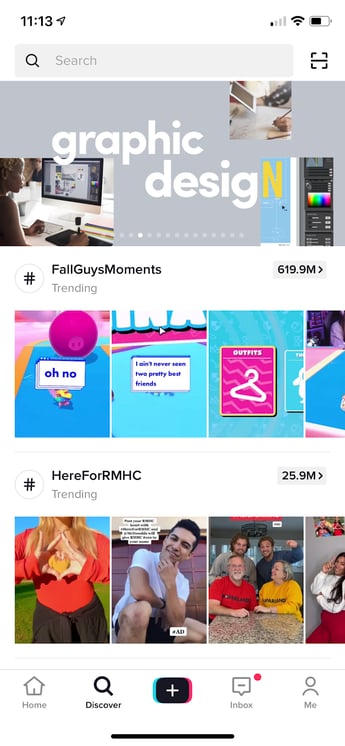
TikTok Discover tab

Image Source

The "Discover" tab on TikTok highlights trending topics and hashtags, a great resource for marketers to generate new content ideas.

B2B marketers have been wary of using the platform, but it could be because success on the platform relies on emotional appeal. Yet, that emotional appeal may be exactly what they need.

According to a LinkedIn study, B2B strategies that appeal to emotions are seven times more effective for revenue generation than "rational messaging."

So, it may be time to start practicing those dance moves.

2. Reels

Some call it TikTok 2.0, but Instagram Reels is proving to be its own beast.

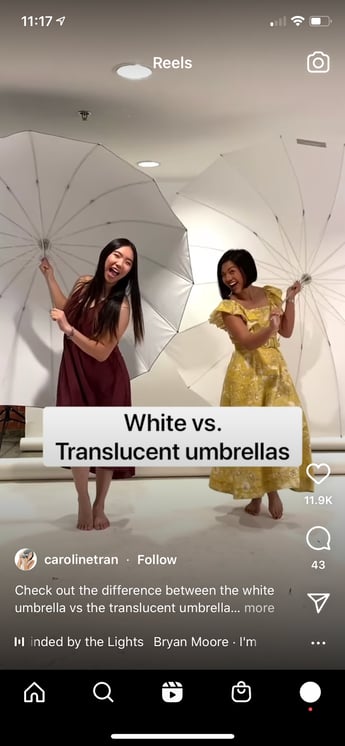
Instagram Reel short form video

The Reels tab on Instagram is a scrollable video timeline, similar to what users see on their Explore page. From this page, users can click on the music the account used to see what other Reels feature that sound.

With over 1 billion active monthly users, Instagram already had consumers’ attention. When they launched Reels back in August of 2020, it became another marketing tool for brands and a worthy opponent for TikTok.Instagram caters to a broader age demographic than TikTok. And when considering their other marketing features, Reels is another way for brands to expand their reach in 30 seconds or less..

3. Triller

Triller is Tiktok’s musical theater friend (or rival), the one who bursts into song anytime, anywhere without cause or notice.

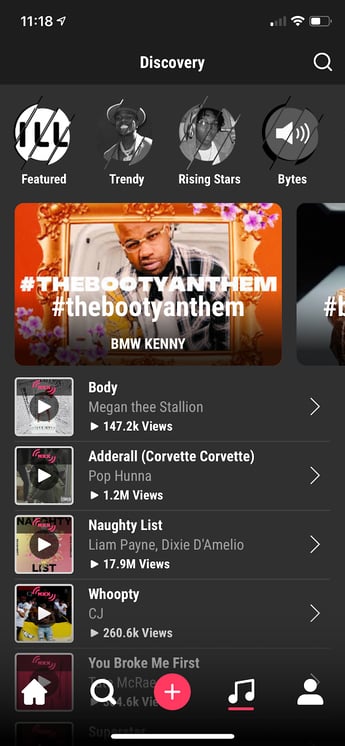
Triller Discovery Page

Triller’s homepage looks similar to other short-form video platforms. However, They have made music a prominent feature on the app by making top and trending music a main tab.

The platform is popular among musical artists and allows users to edit 60-second videos within the app. This includes music, filters, effects, and transitions. Triller grew in popularity earlier this year when there was some uncertainty surrounding a TikTok ban in the United States.

The app reports having 13 million active monthly users who spend an average of 20 minutes a day on the app. With music playing a key role on the app, marketers should use music as a storytelling element in their videos.

For instance, the song "You Got It" by Vedo, a song about unlocking your potential, has been making its rounds on Triller. A recruiting firm could use that sound to create a short video targeting job seekers. The song would also work great as a backdrop for a business coaching company advertising its services. The limit does not exist.

4. Hippo Video

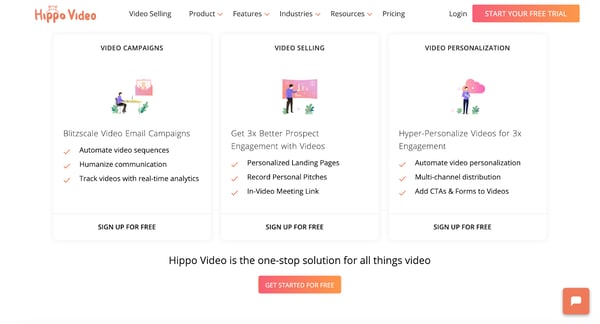
If you want to take short-form video content beyond social media, there’s Hippo Video. The video marketing platform gives brands a one-stop shop to produce, distribute, and analyze their video content. Users can also embed forms, CTAs, and annotations within the video, making conversions easier.

Hippo Video Homepage

Image Source

For example, let’s say a SaaS company is launching a new product and the marketing team is using Hippo Video for the email campaign.

On launch day, they can send a product teaser video to current customers and include a "Schedule a Demo" CTA, leading users to a meeting scheduling page. During the campaign, the team can track key metrics like total plays and average watch rate — taking video analytics to another level.

5. Magisto by Vimeo

Vimeo recently acquired Magisto, a video editing software that makes video marketing easy through artificial intelligence (AI).

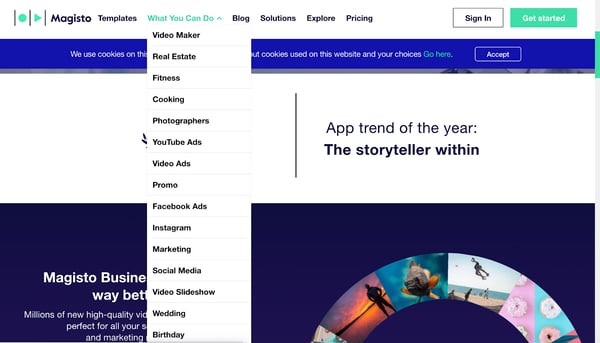
The first step is uploading your videos. The software will then analyze the videos and put it together based on the video editing style you’re looking for. They have over 10 editing styles ranging from real estate and fitness to Facebook and YouTube ads.

Magisto Homepage

Image Source

Once you select the style you’re looking for and the video is complete, you can distribute it on social media platforms and track the analytics.

This platform is ideal for brands that don’t want to spend too much time or too many resources on video marketing. This app does it so you don’t have to.

There are hundreds of ways to incorporate short-form videos into your marketing strategy. But no matter which trends come and go, it will always come back to your audience. Try a few approaches, and listen to where the data tells you to go next.

Posted by https://bit.ly/31tHUKW

Monday, January 4, 2021

User Engagement Is the New SEO: How to Boost Search Rank by Engaging Users

Many businesses aim for their websites to rank highly in search engines, but it's a moving target.

Google, for instance, updated its algorithm 3,234 times in 2018 to meet user needs (emphasizing the "optimization" part of SEO).

You might remember when Google's featured snippet addition disrupted the numbered ranking system of search pages. Because the snippet's goal is to provide a simple answer from a strong piece of content, it might pull from the second or fourth website listed on the search engine result page instead of the first.

As a result, 34% of desktop users don't even click on a webpage, since their questions are answered by a featured snippet on the search results page. This may seem like a cheap tactic to hoard traffic, but it's not. By prioritizing the searcher's experience over the hierarchy of web pages, Google ensures satisfied users.

Optimizing for search engines shouldn't be your main focus anymore. The ongoing shift in Google's algorithm over the past decade indicates a new market focus on meeting user expectations. In this post, I'll do my best to pull back the curtain and show you how improving the user experience on your site will also improve your rankings and increase traffic.

Search Engine Engagement Metrics

Before we delve deeper into the metrics that will likely correlate with an increase in rankings in the age of user experience, it's worth noting that no search engine is an open book. Google notifies the public when it updates its core algorithm, but it's notoriously secretive about this proprietary information.

With this in mind, here are a few user engagement metrics that Google and other engines seem to value as priorities.

Mobile Optimization

In 2015, Google announced that mobile optimization would become a contributing factor to SEO rankings. Half of all searches originate on mobile devices, after all.

Google recommends a responsive web design that adapts to desktop computers, phones, and tablets, and it rewards mobile-optimized sites with higher rankings on SERPs.

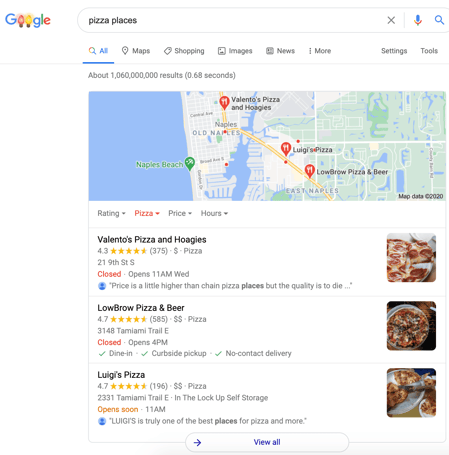
This opens up into another potential benefit: placement in Google's coveted "local pack." The local pack is the set of three businesses featured on Google's search results. Previously, Google featured seven businesses there, but the number has since been reduced to maintain a mobile-friendly layout.

local searchSemantic Search

We've already mentioned that Google's algorithm has drastically changed, especially since the old days of keyword stuffing. The first change allowed Google to judge not only the use of keywords, but also the ways in which they are used. During this phase, keywords and phrases needed to appear naturally. If they detracted from the readability of a page, Google would penalize that page's ranking.

After the 2013 Hummingbird update, the search engine's algorithm considers overall meaning — it realizes a page is more than the sum of its keywords. For instance, if you searched for "What's the fastest animal?" prior to Hummingbird, a page would have to use the keywords "fastest animal" in several places to communicate the topic to Google's crawlers. Now, with semantic search, Google can compare search intent with a page's content to provide a better search experience.

Most recently, Google has helped searchers by rolling out BERT. This technology was designed for users who increasingly search by posing questions. It considers search intent by analyzing how a word relates contextually to the words that precede and follow it. Most searches made via voice recognition are questions, so this advancement will probably benefit Google in the future (Comscore predicts that half of all search engine inquiries will be voice searches by 2020).

Dwell Time

The dwell time metric is determined by the amount of time a user spends on a page before navigating back to a search engine. Search engines use this metric to judge the relevance of a page to a user's query. If a user stays on a page for a long time before bouncing back to the SERP, then that page is likely more valuable than others.

Browsers such as Google Chrome, which is used by 81% of W3School's 50 million monthly visitors as of August 2020, know how long a visitor remains on a page. Dwell time is a significant indicator of relevancy and quality, so webpage designers should aim for visitors to remain on a website for as long as possible.

Unfortunately, dwell time is one of many metrics that only search engines have access to. However, you can still use other data to measure the user engagement on your own site. Tracking metrics like time on page, bounce rate, and conversions from your landing pages can provide crucial insights into the value your users get from their experiences with your website.

4 Ways to Boost User Engagement on Your Website

Realistically, it's easy to understand how a great user interface has the potential to boost search rankings, but making it happen is another story. Let's take a look at several UX SEO best practices.

1. Augmented Reality

In 2017, personal care and beauty store Sephora released the Visual Artist update on its app. Users can virtually try on lipsticks, eyeshadows, and other cosmetic products from the comfort of their homes. This small user experience-focused change resulted in a reported organic revenue growth of 14% parent company LVMH.

Augmented reality is increasingly accessible to smaller businesses. It is quite common to find eyeglass retail websites, for instance, boosting user engagement with AR features that allow shoppers to virtually try on glasses.

You can also use this technology to include customers in the experience of launching a product. Jordan Brand did just that with the release of its Air Jordan III Tinker sneakers. Sneaker fans could scan a Snapchat code, purchase through Shopify, and have the shoes delivered by local fulfillment centers within the day.

2. Interactive Tools

Increasing user engagement is as simple as finding ways to capture the attention of a website visitor. Interactive tools and activities that occupy a user's time (and provide value) are essential when creating a top-notch search experience.

This could be something simple such as a mortgage cost calculator on a home lending website, a responsive chatbot, or live user survey feature on your landing page. Warby Parker, for example, has enhanced the online prescription glasses retail web experience by offering an online quiz for picking out the right frames. The simple quiz provides personalized fashion advice and leads visitors along their sales journeys.

warby parker quizIn fact, if you use a tool like SEMrush to identify the most trafficked pages of a popular website, you will often find that they are interactive. These tools keep users engaged. By installing event tracking within the tools, Google Analytics can report just how engaging they are.

3. Video Content

Many marketers fear that video content will slow down their pages and cause the bounce rate to skyrocket. This is a valid concern, but it also may be worth the risk. Video is easier for people to process, and it can encourage someone to stay 2.6 times longer on a webpage. Well-placed video enhances dwell time and boosts rankings.

For example, Toyota used video in its interactive "Choose Your Wild" campaign for its 4Runner vehicle. The video engages potential customers by letting them go virtually "off-road" in the vehicle and, at the same time, allows the company to collect customer preference information in a fun, unobtrusive way.

4. Lead Magnets

Surprisingly, some of the most effective ways to ensure you're providing an exceptional user experience aren't particularly innovative at all. Lead magnets with gated content aren't a new tool in the digital marketing space, but you'll find that you'll command your audience well by understanding their needs and producing applicable content.

After all, the subtext of Google's movement toward user-friendly webpages is really just ensuring that high-ranking pages are valuable content resources. You will be improving the user experience and prioritizing conversion optimization at the same time.

Bidsketch uses this approach: It offers a free sample proposal in exchange for a voluntarily disclosed customer email address. Content-heavy websites like The Oatmeal and BuzzFeed similarly capture email addresses by offering quizzes (which also enhance user engagement and dwell time). Try offering various free "goodies" as lead magnets such as spreadsheets, tutorials, generators, or calculators.

By keeping users engaged with valuable, meaningful content, you will not only create happier visitors (and maybe brand advocates), but you will also rank highly on Google.

Whether that engagement stems from augmented reality, interactivity, videos, lead magnets, or some other approach, it can make all the difference in the success of a company's user experience and SEO efforts.

Posted by https://bit.ly/31tHUKW

Marketing Trends to Watch in 2021, According to 21 Experts

Marketers are community-minded people. We collaborate across multiple departments in our own companies, while keeping track of competitive players and ensuring we're deeply connected to the needs and goals of our customers.

So, to better understand what to expect or pay close attention to in 2021, I've connected with 20 marketing experts for their perspective.

While there is significant diversity of ideas and visions presented below, I love the common theme of how we're working toward a better future together, which is why my prediction is this: Marketing in 2021 will be more empathetic than ever.

I continue to believe in my mantra that marketing is powerful and must be used for good, not evil. That might sound overly simplistic, but I do believe it's paramount that marketers understand their influence and what a wonderful positive power it can be.

We are humans, serving humans. Whether B2B or B2C, customers are looking for brands they can trust to meet their needs and make their lives easier or more delightful. If we treat each person with loving kindness and respect, we'll be making the positive impact I know we can while building a stronger, more loyal base.

Here's what else 2021 has in store based on the predictions of this fabulous group of marketing leaders.

Virtual Events

1. Marketers will plan asynchronous events that plug into the funnel.

Latané Conant, Chief Market Officer at 6sense, predicts: "This year saw an explosion of virtual events as marketers adapted to a changing world. While I suspect a lot of us are feeling some virtual burnout right now, there will still be a place for these kinds of events, even after we resume in-person ones. Imagine a virtual event running 24/7."

"Your prospects get triggered into the event as they proceed to the right steps in your funnel, and they engage with this event through multiple means, like Netflix meets Slack. There's video content they watch on-demand, there's a live stream playing on-site and there's a community of users and fans who create a unique and engaging place to be. Prospects learn about your solutions and then, after watching videos and chatting with others, they get directed immediately to your product team. Now that sounds like a virtual event worth attending!"

2. Community marketing will replace event-based marketing.

Adam Masur, VP of Marketing at Credly, told me: "The era of anchoring marketing around a big, industry event is coming to a close. We've all seen the annual conference go virtual due to the impact of COVID-19. But I expect hosts to find that their audience's appetite for the singular virtual gathering will wane, as well."

"Look for more intimate, and more topical online get-togethers in 2021. Experts with verified digital credentials and a willingness to share will be highly valued virtual community leaders and influencers."

"Companies should be ready to be active contributors and bring practical value to the conversation." 

3. Businesses will find new ways to encourage online connections.

Kevin Alansky, Chief Marketing Officer at Higher Logic, says: "The virtual and digital-first world will continue in 2021 and possibly beyond. Many organizations have shifted their annual event and tradeshow to a virtual one. Many organizations have not succeeded, however, because they tried to replicate the experience on an outdated model. This has led to a flood in the number of virtual events and many people facing 'Zoom fatigue.'"

"Organizations are now wondering how to fight this overcrowded market and stand out against the rest. The answer is online communities — how do you engage before, during, and after your event? We need to find ways to better engage our audiences and build meaningful connections between our organizations and our customers. We are seeing the demand for engagement already this year and this will continue to be a big trend through 2021."

4. The interactivity that's been promised for decades is now a necessity for 2021.

Jake Milstein, CMO at CI Security, told me: "When the pandemic hit, there was a huge spike in registrations and attendance in virtual events that attempted to mimic in-person events. Attendance at those events lasted a month or two and then dropped off quickly. People are looking for more human interactions — something out of the norm. Webinars just don't do it anymore."

"People are now interested in discussions and panels in which they can ask questions, they can be part of the action, they can offer their own expertise. That's not something you could do when watching someone on-stage, but we all know it's something you can do online. The interactivity that's been promised for decades is now a necessity for 2021." 

Brand Values

5. Customer-centricity will propel brands forward.

Natalie Severino, VP, Marketing at Chorus.ai, predicts: "Throughout the many challenges of 2020, revenue teams have been able to weather the storms and thrive by putting the customer at the center of every decision. This is only made possible through total alignment between sales, marketing, and customer teams, as all must rely on using the actual voice, pain points, and goals to create a winning partnership."

"While conventional methods of relationship building, like in-person meetings, may not be possible today (or simply don't scale quickly enough), entering 2021 provides us a paradigm shift for bringing relationships and shared business goals to the forefront of every opportunity."

6. Brands will navigate an increasingly polarized social and political climate.

"One of the biggest trends to watch in 2021 will be how brands navigate an increasingly polarized social and political climate. Presidential politics, the response to navigating the global pandemic, and an increasingly siloed media and social media landscape is forcing brands to make hard decisions about how and where they align with their customers."

"Every ad dollar spent, every choice of channel and platform, every social post, every inch of shelf space, and every conference or trade show will be evaluated through the lens of what a brand's marketing decisions say about who they are and what they stand for," says Tim Linberg, Chief Experience Officer at Verndale.

Revenue and Budget

7. A/B Testing will become a waste of time and budget.

R. J. Talyor, CEO and Founder at Pattern89, says: "The next decade will see the end of A/B testing. Marketers have long relied on validating their intuition with A/B tests to guide creative advertising and marketing decisions — however, the rise of AI makes this not only obsolete, but wasteful."

"Once machine learning predicts the trends before they happen and provides clear guidance for marketers, why waste money to A/B test something that wouldn't work as well? Soon, marketers will be able to go all-in on what will work best without having to test the theory." 

8. Digital marketing spend will continue to grow.

Bridget Perry, CMO at Contentful, predicts: "We've found a digital innovation gap between what customers demand and what brands are currently capable of delivering. That's why digital leaders across industries tell us they plan to spend, on average, 25% more on digital in 2021. And 25% is just the average — some plan to spend significantly more. CMOs who aren't scaling up their digital spending will soon be outpaced by competitors." 

9. Tech spending levels will return to normal over 2021 — but not all categories will benefit.

"Some companies will remain remote, others will move to hybrid offices, and some will — eventually — go back to business as usual. In 2020 we saw user searches jump on TrustRadius for software categories like e-signature, collaboration, video conferencing, endpoint security, antivirus, and of course telemedicine. Those categories will stay strong in 2021 and beyond, reflecting the new workplace. Other categories — event management and facilities management, for example — will radically reinvent themselves," says Russ Somers, VP Marketing, TrustRadius.

10. Content marketing will start with conversations.

"The content marketing playbook we've been using is at least two decades old. Marketers are still focusing on keyword-heavy blog posts as the main tactic to captivate their audience. But it's a strategy made for Google, not for people."

"Today, your audience wants to have an authentic experience with your brand and the best way to do that is by leading with conversations."

"As marketers aim to create a more human-centric experience, we will see more content pulled from actual conversations with people in the industry who can provide that genuine interaction today's consumers are looking for," Lindsay Tjepkema, CEO of Casted, told me.

11. Many companies will decrease their marketing budgets.

Melissa Sargeant, CMO of Litmus, says: "In the coming year, marketers will experience budget cuts and even smaller teams. But, by doing this, companies are setting themselves up for failure. During an economic downturn, companies that pull back and starve marketing efforts, do not perform well. And, when our consumerism-driven environment re-engages, those brands will be further behind than they were when they made those budget-conscious decisions."

"Ultimately, the pandemic has accelerated trends in business. Look at digital transformation and work from home initiatives, for example. But, if there were cracks within a business's model beforehand, the pandemic brought those to light so now is the time for them to fix it, not bury it. Businesses have to position themselves the best they can now in order to come out even stronger in the end. And, it requires a mature, advanced multi-channel strategy with experienced marketers."

Teams and Collaboration

12. In 2021, it's all about people, people, people.

Caroline Tien-Spalding, CMO at Aptology, says: "Marketing's north star will be evolving in 2021. Marketing has always been about understanding people and acting on that knowledge. A key difference in 2021 is that marketers are able to know more than ever. It's the rise of the psychologist, and the rise of the digital marketer." 

13. Many companies will implement a new Web Operations team.

Christy Marble, CMO at Pantheon Systems, predicts: "Marketers will require technology to enable real-time responsiveness to customer needs that span the customer lifecycle and each customer touchpoint. The events of 2020 taught us that we must demand the agility to transform on a moment's notice to respond to customer needs. This forced an end to the era of lengthy multi-year brand and website re-builds."

"In 2021 those will be figments of the past, replaced by cross-functional teams that collaborate through technology-enabled workflows to continuously test, learn, and evolve their digital customer experience. These WebOps teams will have a distinct advantage — especially those supported by artificial intelligence, machine learning, and automation."

"The pace of change has accelerated, but one thing will remain constant: Marketers who focus on people — on customer experience — will be the ones who will keep pace with change. Focus your team on improving personalization, advancing your customer journey, and creating a truly authentic web experience that meets your customers where they are." 

Digital Transformation

14. Brands will unlock the key to orchestration.

Andrea Lechner-Becker, CMO at LeadMD, told me: "Data should be on every marketer's mind as we enter 2021, but not in the way it usually is. B2B marketers must realize they're generally strong with orchestrating their own data, but weak with third-party data — which must be a top area of focus. They can't afford to depend on marketing automation or CRM platforms for this, but will need to strongly consider creating their own system, something along the lines of a CDP. If they do that? They've unlocked the key to orchestration and success with data in 2021."

15. The 'panic pivot' will turn into more purposeful reinvention.

 Laliv Hadar, VP Marketing, InVision Communications, says: "In 2020, out of pandemic-induced necessity, marketers have rapidly transformed face-to-face events into virtual ones, and developed innovative ways of connecting with audiences digitally. In 2021, this reactionary 'panic pivot' will turn to more purposeful reinvention of the ways we engage our core audiences. That reinvention will manifest in hybrid audience experiences that are wholly connected across the communications ecosystem. This integrated brand approach will be built on the premise that our audiences comprise real human beings, whose brand perceptions are shaped by their experiences, and now, more than ever, crave professional empathy and connection."

Because while quarantines, social distancing and remote work will play a critical role in our eventual emergence from the COVID-19 pandemic, they also have had a significant side effect: Disengagement. 2021 will see marketers tapping into the human need for just the opposite: engagement."

16. Brands will capitalize on change.

John Graff, Chief Marketing Officer at Sonim, predicts: "I believe 2021 will be a year that will provide significant opportunities for companies to grow/expand market share. Why? Because many companies will fall into the trap that there will be a post-2020 'return to normal.' Marketing has already been experiencing constant change and evolution the last decade, and just because many people are ready to get past COVID times, does not mean the change will stop. In fact, for best of breed, it very much will accelerate. Everything has been changed, whether it's work-from-home, education, online retail, and more."

"The best marketers will look to capitalize further on those changes in 2021, while others unfortunately revert to the old pre-COVID playbooks. It's a great time for marketers to further embrace change, and be the stewards of helping their companies grow and gain share in 2021!"

17. Marketers will continue to incorporate real, true personalization.

"Marketing automation should not be confused with personalization. Oftentimes, it's just quicker batching and blasting. When marketers use intent data and data-based insights to fuel their automated communications, they can create remarkable brand experiences sophisticated consumers rely upon. In the year ahead, marketers will better incorporate real, true personalization." says Nick Runyon, CMO of PFL.

18. Marketers will rely on deep data insights and machine learning to deliver value to prospects.

Richard Jones, CMO of Cheetah Digital, predicts: "The next generation of personalization is not about cookies or third-party data, it's not about merchandising, and it's not about guesswork. The next generation of personalization is about relying on deep data insights, first and zero-party data and using machine learning to derive not only the right content, not only the right offer, not only the right channel but, the right sequence of events that leads to an automated path to conversion."

"The next generation of personalization is about providing a value exchange for consumers in the 'moment' when you have them on your mobile app, on your site, in your store. How can you provide them something that will generate trust and affinity with the brand?"

19. Cross-channel integrations will continue to grow.

Meg Scales, CMO of SlickText, told me: "Incorporating multiple channels within campaigns is much more effective than simply putting all your resources into one channel — even a versatile channel like SMS. It's why we'll see channels and varying tactics continue to cross-integrate in the coming year."

"For example, channels will adopt services like loyalty programs to better connect brands with customers through a variety of strategies within just one platform. Also, a customer interaction in one channel could trigger a personalized, automated sequence in another, creating data- and behavior-driven campaigns many are unable to produce currently due to a lack of time, money and expertise."

20. We'll see an acceleration with the digital-first shift.

Auseh Britt, VP, Growth Marketing at Terminus "We saw an acceleration in the shift to digital in 2020, mainly due to the gap left by live events. Substitutes like virtual conferences lacked the ability to really engage audiences, making them glorified webinars, exacerbating the 'Zoom' fatigue."

"I see this trend continuing in 2021 as we look for more creative ways to engage customers and prospects through hyper-personalized outreach, high impact direct mail, intimate and interactive virtual experiences, and relevant educational content."

Posted by https://bit.ly/31tHUKW

Friday, January 1, 2021

6 Ways to Use Icons in Your Infographics [+ Where to Find Free Icons]

Whether it’s an explainer on solar panels or the farm-to-cup process of making your favorite coffee, infographics compress a world of information into one simple, digestible format.

But designing an infographic that successfully communicates a lot of information in a simple visual format requires more than a quick idea and a template.

Fortunately, there's one design element that the best infographics all have in common, and it can help you build a professional infographic that gets your point across and looks good doing it.

Icons are the secret tool that designers use to take your eye from one point to another so that all that information comes to you in just the right order.

Icons form the secret language of infographics, and once you learn how to speak it, yours will be more effective and (hopefully) widely shared by your audience.

Why Do You Need Infographic Icons?

Infographics can be a great source of information when you’re introducing a complex topic to an unfamiliar audience. People love sharing them because they can communicate a vast quantity of information in an elegant, easy-to-digest format.

However, it’s easy to create an infographic that is overwhelming or which simply falls flat. Icons streamline the process of creating the infographic and ensure that it effectively communicates the information it’s meant to share.

Infographic icons give structure to your infographic and can be used to highlight key pieces of information. They can also efficiently explain what happens at important junctures of the process without relying on words. You have a limited amount of space on an infographic, and icons help you say more with fewer words.

6 Reasons To Use Icons in an Infographic

1. They help your audience focus.

A good infographic is a buffet for the eyes, and your readers could have trouble focusing on just one part of it at a time. Icons provide a much-needed sense of structure to the information in your infographic and create a guided experience for the viewer. Good icon placement makes navigating your infographic a more intuitive experience for your audience.

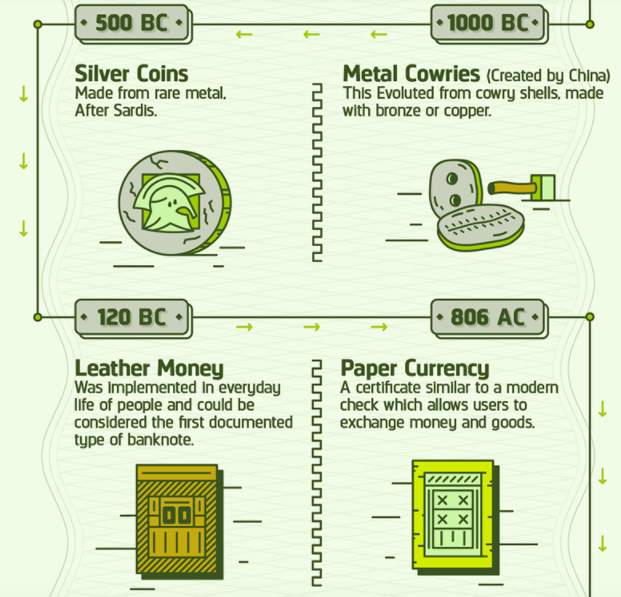
In the excerpt of an infographic from Infographic Journal that covers the entire history of currency from 9000 BC to the present, the author uses icons to mark key events and add interest to what could have easily been a boring timeline. Small (but important) arrow icons along the timeline also keep the reader moving along in the right direction.

2. They make the words you use count more.

Want to make your text stand out on your infographic? Try pairing it with an icon. It’s easy for your words to get lost among the visuals of your infographic.

Icons can bring attention to specific words or charts, and help the viewer leave with clearer, more memorable takeaways. They can also tip off the reader what to expect from each section, allowing them to focus on the subjects that interest them first.

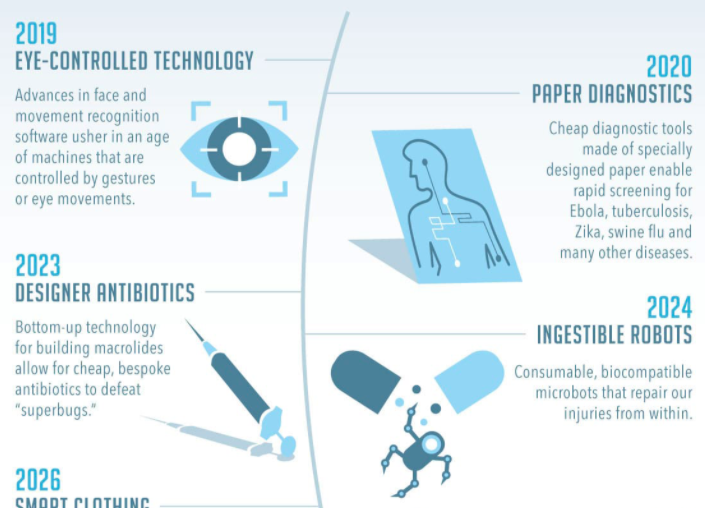
In this excerpt of an infographic from Futurism.com, complex concepts (that could have each required a lot of text to explain) are accompanied by custom icons that help reinforce the titles of each section with fewer words.

You might not immediately know what "ingestible robots" means, but when you see the image of the robot popping out of a pill capsule, you get a better grasp on it immediately.

3. They make data easier to understand.

Graphs displaying complex information can be challenging for many people to grasp at first, but a simple icon can prime your audience to understand the data it presents and why it matters to them.

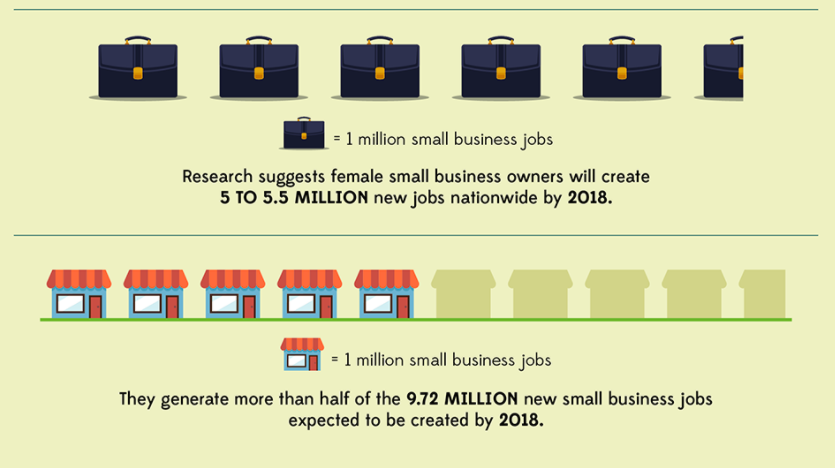
For complex graphs, multiple icons can break down individual sections and allow the audience to derive more value from it, making it more likely they share it with their networks. You can also use icons to represent amounts in a graph instead of raw numbers to make them easier for your audience to grasp.

In this excerpted screenshot of an infographic from USC Marshall School of business, icons are used to convey data in place of a more traditional graph:

4. They can help you say more with less.

Icons are an ideal medium for telling a simple story that hits on the main theme of your infographic. This can form a unifying message that allows your target audience to connect with the information presented.

Your infographic’s data tells a story, and icons can show it to your audience immediately. From cave paintings to fire exit signs, icons can be used to create powerful, engaging stories with the simplest of shapes.

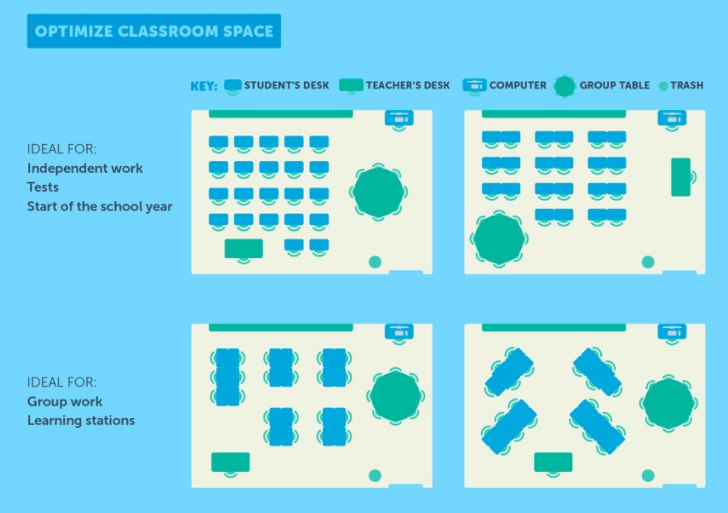
You can get a feel for how icons can effectively communicate complex pieces of information in the except of an infographic from USC Rossier on the science of classroom design. Describing each of these classroom formats would have been cumbersome and required a lot of text, but with icons, a lot of information can be condensed in a simple visual.

5. They tap into shared meanings.

The best thing about icons is they often mean the same thing in every context they’re used. This allows you to introduce meaning into your infographic without having to explain it to your audience directly (and take up valuable space on your design). This ultimately makes your infographic more accessible and easier for your audience to understand.

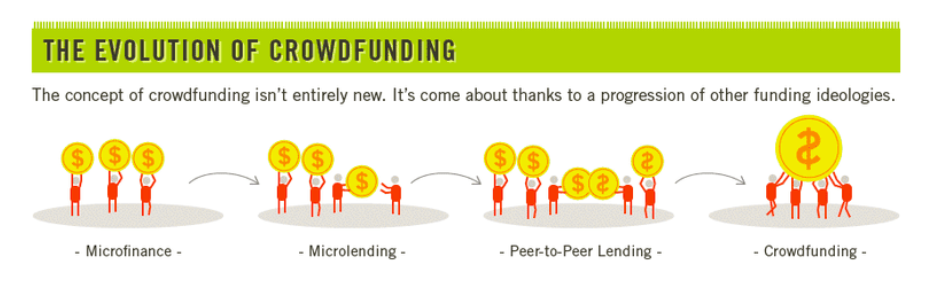
In the infographic excerpt from Daily Infographic below, the designer makes excellent use of two instantly recognizable symbols -- money and people -- to explain the evolution of crowdfunding.

6. They contribute to your brand's personality and voice.

The icons you choose can add personality to your infographic and are an excellent opportunity to showcase your branding.

What do cute, fun, icons, or hand-drawn ones say about your brand or the information you’re providing? What about sleek, polished ones? The aesthetic you choose for your icons is just as important as any other piece of information you choose to include in our infographic.

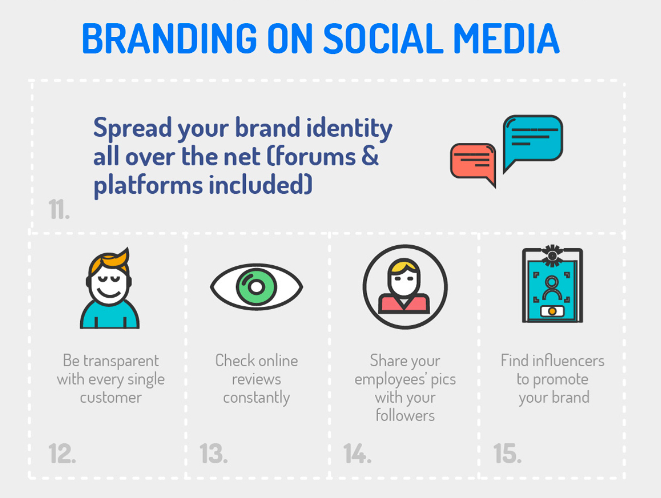
In the example below from Printsome, a company that specializes in printing and design, it makes sense that the creator chose to use a clean, consistent icon aesthetic that fits in neatly with the branding of their website.


The Best Free (and Almost Free) Resources for Infographic Icons

There’s a wide variety of free and nearly-free sources for infographic icons and elements online. We’ve listed some of them here for your next project.

Flaticon

Looking for free vector icons created by a wide variety of designers? Flaticon is a great place to begin your search. With 3,641,000 (and growing) free vector icons available on the site, this site is a solid option if you have a specific design in mind and a limited budget.

Icons8

If you're looking for a more curated selection of options, Icons8 offers free icons that are designed entirely by a single team. This is a great option if you have plans to create a series of infographics and want a consistent look between all of them, regardless of the subject matter.

Noun Project

Noun Project believes icons help create an important global language, and their unique (and extensive) collection includes more specific options -- we're talking everything from icons representing abstract artificial intelligence concepts to Beyoncé -- that you likely won't find anywhere else on the web.

DaFont

If you've ever sought out free fonts on the web, you've probably encountered DaFont -- but did you know they also have a solid selection of icons? If you'd prefer to use icons in custom font format instead of downloading them as images, DaFont is a good free option.

Iconshock

Most of Iconshock's library is free to use for noncommercial purposes. If your infographic is for commercial use, you’ll pay a one-time fee for most icons here, which is a budget-friendly option if you're still testing out infographics as a marketing strategy.

Iconfinder

Iconfinder offers a nice balance of extensive options with some expert curation -- which is a bonus if you're not interested in filtering through hundreds of pages to find icons that fit your ideal aesthetic. Most icons featured here are available for free for personal use, while pricing plans are available if you plan on using any of the icons commercially.

Behance

Behance is a platform where designers around the world can showcase and sell their design work and connect with potential clients -- but many generous designers also offer some design goodies for free. If you're willing to spend some time searching, there are certainly some hidden gems on Behance that are worth the search.

Icons give your infographics shape.

Icons are vital tools that can bring meaning and structure to your infographic while enabling greater word economy in your overall design.

They can help to orient the viewer to the information and provide cues that indicate the flow of the infographic. Even if your viewer is completely unfamiliar with the information in your infographic, icons with a widely-recognized meaning can help to improve their understanding of it.

Ultimately, the icons you choose for your infographic and the way you use them can improve its overall utility for your viewer.

Posted by https://bit.ly/31tHUKW

How to Make a Timeline Graphic in Google Docs, Word, Excel, Google Sheets, and PowerPoint

Infographics are a great way to capture user attention and communicate key concepts. Why? Because they combine relevant information with graphic impact to increase retention and engagement.

Data backs up this common-sense assertion: Research found that people retain 65% of the information they see — but only 10% of the information they hear — and spend 39% less time searching for the content they need when it’s displayed in infographic format.

One of the most compelling uses for this functional format? Timeline graphics. These date and data delivery vehicles offer a way to quickly communicate important information — from key dates in your company’s history to upcoming project milestones or predicted market trends.

Of course, it’s one thing to see the value in timeline graphics and another to actually create attractive and effective visuals. In this piece, we’ll tackle timeline tactics for familiar applications including Google Docs, Word, Excel, Google Sheets, and Powerpoint.

3...2...1...let’s go!

What is a timeline graphic?

While there’s no single format for timeline graphics, the most common composition uses four parts:

  • Data
  • Visual
  • Header
  • Description

Each timeline element contains all four parts, and elements are then arranged in left-to-right order of oldest-to-newest events. This format offers simplicity of form and function — elements are easy to read and identify, and the “flow” of time is simple to spot.

Let’s say you’re creating a timeline of key events in your corporate history using this framework. It might look something like this:

an example of a timeline graphic made in google docs

This (very basic) example was made in Google Docs and uses an arrow to denote the passage of time. Dates above the line are paired with brief details below. Some timelines will include both a header — such as merger — with a longer description below. How much information is worth including depends on the complexity of the topic at hand, who’s going to be using the chart, and its overall purpose. In this case, our graphic element is the line itself but you can also insert relevant images of people or places associated with the event to increase user engagement.

Another common graphic timeline format runs top-to-bottom with earlier dates at the top of the page and later dates further down. To maximize space many of these top-to-bottom templates alternate information left-and-right down the line.

How to Make a Timeline on Google Docs

So how do you make a timeline graphic?

1. Create a picture.

Head to “Insert”, then select “Drawing” and “+ New”. This will bring up a new window that looks like a checkerboard.

2. Start drawing.

Select the “Line” button from the top menu and choose “Arrow”. Then, draw a line across the screen. To make sure it’s straight, look at the left-hand side — if you only see one line, it’s level. If you see more than one, it’s at an angle.

3. Enter your text.

Click on the Text Box tool — represented as a T surrounded by a box — and create a box above or below your line to start adding details. You can either copy and paste multiple boxes to ensure consistent sizing and spacing or use a single, giant text box. While the latter option is quicker to create (we used it) the natural left-to-right format of the box means you’re limited in how information appears.

4. Save and close.

When you’ve entered all of your timeline data, click “Save and Close” and the image will be automatically added to your Google Doc.

How to Make a Timeline in Word

Maybe you don’t like Google Docs, maybe your company uses Microsoft Office exclusively, or maybe you don’t like the idea of potentially shared timelines. Whatever the case, it’s also possible to create a timeline graphic in Word.

1. Insert SmartArt

Open a new Word document and head to the “Insert” tab, then select “SmartArt”.

2. Find your timeline.

From the new menu that appears, select “Process”. This will bring up a host of potential timeline graphic options, everything from single, large arrows to connected text boxes to linked circles. The simplest option is the “Basic Timeline” which contains dots embedded in a large, transparent arrow.

3. Enter your data.

Use the text pane located on the left-hand side to enter your timeline data. Pressing “Enter” creates a new timeline entry — if you need to add more information to a specific timeline item, press Shift+Enter to create a line break.

4. Customize your timeline.

Customize your timeline dots and arrow with shapes or colors to achieve your desired look.

Word does not automatically calculate time between events; as a result, all items on your timeline will be equidistant from one another. If you need to communicate a larger span of time, you can drag events further apart manually, but this will eventually distort the graphic.

How to Make a Timeline in Excel

If you enjoy using Microsoft Office for creating timelines but want to make things more difficult for yourself, try building an Excel timeline. While the finished product offers easily-accessible data in a familiar format, the effort required is significantly more substantial.

1. Create a data table.

Create a three-column table in Excel that contains your timeline data. Use the first column for dates and the second for event titles. In the last column, enter a series of numbers — these numbers will determine the height of your timeline plots. You can set them all to the same height with the same number or different heights in a repeating pattern depending on your preference.

2. Insert a scatter chart.

Select “Insert” from the top Excel menu, then “Charts”, then select a Scatter chart.

3. Import your data.

Right-click the chart that appears and choose “Select Data Source.” Select the “Add” button in the “Legend Entries (Series)” menu that appears. Click on the small spreadsheet image that appears next to the “Series X values” box, then choose the column of dates you created.

Then, select the small spreadsheet next to the “Series Y values” box and choose the data in your timeline height column. Click “OK” and you’ll create a scatter chart with dates at the bottom and dots at varying heights.

4. Eliminate gridlines, add error bars.

Select your chart and find the “+” in the upper-right to bring up the Chart Elements menu. Uncheck “Chart Title” and “Gridlines”, then check “Data Labels” and “Error Bars”

5. Connect the dots.

Head to the “Error Bars” menu option and select “No Line” for your Series X Error Bars — this will remove the horizontal lines on each side of your data points. For your Series Y Error Bars, set the direction to “Minus” and the Error Amount to “100%”. This will create vertical lines between your dates and your data points.

6. Insert event titles.

In the “Format Axis” menu, select “Series 1 Data Labels”, uncheck “Y Value”, and select “Value from Cells.” Then, click the small spreadsheet icon. Select your event titles column and then click “OK”.

This should create a basic timeline with dates along the bottom and data points at varying height, each with a small description above. If desired, you can add extra formatting and color options from the Format Data Series menu.

How to Make a Timeline in Google Sheets

The polar opposite of Excel, Google Sheets makes it easy to create project timeline.

1. Create a new timeline.

Open Google Sheets and select the “Project Timeline” option.

2. Customize.

Edit your timeline. Change any text box, add colors, and modify dates as required. While customization is bounded by the basic format of this Gantt chart, Google Sheets offers one of the easiest ways to create and share a timeline.

How to Make a Timeline in PowerPoint

Making a timeline in PowerPoint is almost identical to the process used in Word.

1. Select your design.

Head to the “Design” tab and select your theme.

2. Insert SmartArt.

Click on “Insert”, then “SmartArt”.

3. Choose and fill your timeline graphic.

Select the timeline you prefer and it will be created with three elements. Add text to the elements directly, and use “Add Bullets” to add bullet points below. Select “Add Shape” to additional timeline sections.

Timing is Everything

Timeline graphics add convenient context to otherwise dry data points. From details about your company from inception to current interaction to in-depth project milestone markers, visual timelines in Google Docs or Sheets, or Microsoft Word, Excel, or PowerPoint offer a way to capture critical data while simultaneously boosting viewer interest and bolstering information retention.

Posted by https://bit.ly/31tHUKW